Get Support
+1 (703) 665-8657
 By:
By: 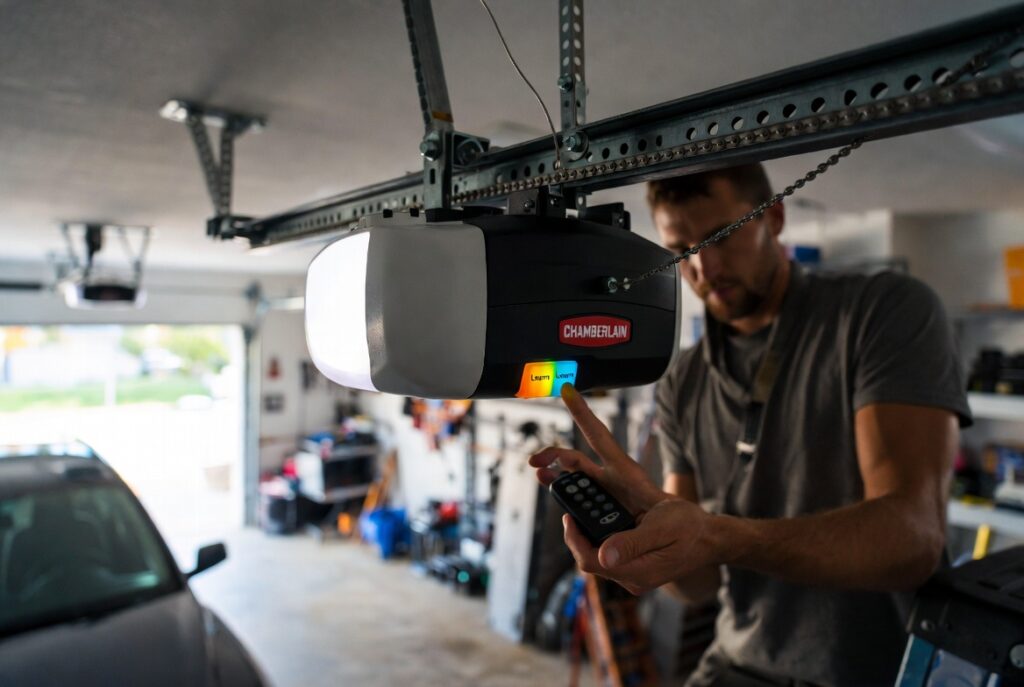
If you’re a homeowner in Northern Virginia, you know how convenient a garage door remote can be. But what happens when you buy a new remote, the old one stops working, or your garage door opener just won’t respond? That’s when knowing how to program a garage door remote becomes essential.
The good news is that programming a Chamberlain garage door remote is usually simple, safe, and something you can do yourself—even if you’re not tech-savvy. In this guide, we’ll walk you through everything step by step, explain common issues, give safety tips, and let you know when it’s time to call a professional.
Why Programming a Garage Door Remote Matters
Imagine it’s a rainy morning in Alexandria or Fairfax. You’re running late for work, you press your remote, and… nothing happens. Your garage door won’t open.
It’s frustrating, but often the problem isn’t with the entire opener — it’s just a programming issue. Remotes can lose their connection for several reasons:
- The battery died in your old remote
- You bought a new remote
- You installed a new garage door opener
- A power surge reset your system
- You want to add an extra remote for family members
Knowing how to program your remote ensures your garage door works smoothly, keeps your home secure, and saves you time and stress.
Quick Reference Table: Common Remote Issues
| Problem | Likely Cause | Solution |
| The remote doesn’t respond | Dead battery | Replace battery and reprogram |
| New remote | Not paired | Follow programming steps |
| Multiple remotes | Not all paired | Program each remote individually |
| The garage door opens intermittently | Interference or weak signal | Check battery, reprogram, keep remote close |
| Smart opener issues | App or Wi-Fi settings | Check Chamberlain MyQ app and re-sync |
Step-by-Step Guide: How to Program a Chamberlain Garage Door Remote
Step 1: Prepare Your Remote and Opener
Before programming, make sure:
- The remote has a fresh battery.
- You are standing close to your garage door opener (usually mounted on the ceiling).
- The garage door is closed — it’s safer to program the remote when the door isn’t moving.
Safety Tip: Never stand under a moving garage door while programming. Keep hands and fingers away from tracks, springs, and rollers.
Step 2: Locate the “Learn” Button on the opener.
The Learn button is the key to syncing your remote.
- Look on the back or side of your Chamberlain opener unit.
- It may be yellow, red, orange, or purple depending on the model.
- Pressing it puts your opener into programming mode.
Step 3: Enter Programming Mode
- Press the Learn button once.
- The opener light may blink, or you may hear a click; this indicates it’s ready to pair.
- You typically have 30 seconds to press a button on your remote.
Step 4: Program Your Remote
- Press the button on your remote you want to use.
- Hold it for 2–3 seconds, then release.
- Look for a confirmation: lights blink or you hear a click.
Test the remote immediately to make sure it opens and closes the door correctly.
Step 5: Program Additional Remotes
If you have multiple remotes:
- Repeat Steps 3–4 for each remote.
- Each button must be paired individually.
Step 6: Sync Keypads or Smart Devices (Optional)
For Chamberlain keypads or MyQ smart devices:
- Press the Learn button on the opener.
- Enter the code on the keypad or follow app instructions.
- Test to ensure smooth operation.
Common Troubleshooting Tips
| Problem | Solution |
| The remote doesn’t work | Replace battery and reprogram |
| The garage door opens intermittently | Reprogram remote, check interference, keep remote close |
| Lights blink but door doesn’t move | Press Learn button again and retry |
| Multiple remotes not responding | Clear opener memory and reprogram all remotes |
| Programming fails repeatedly | Unplug opener for 30 seconds, then retry |
Signs Your Garage Door Remote or Opener Needs Attention
Sometimes programming fails because of underlying issues:
- The garage door opens or closes unevenly
- The door jerks, shakes, or reverses unexpectedly
- The opener beeps or flashes error codes
- Remote works only intermittently
- The remote range is much shorter than before
In Northern Virginia, homeowners sometimes notice these issues after storms, power outages, or after installing new smart devices.
Safety Tips While Programming Your Remote
- Always keep children away from remotes and garage doors.
- Stand clear of the moving door at all times.
- Never attempt to fix springs or cables yourself — they are under extreme tension.
- Disconnect power before inspecting wiring or electronics.
- Use a sturdy ladder if you need to reach the opener unit.
When to Call a Professional
Programming a remote is usually straightforward. However, call a professional if:
- You replaced the battery, and it still doesn’t work.
- The garage door opens unevenly or won’t close.
- The opener beeps or flashes error codes.
- Cables look loose or damaged.
- You notice grinding or unusual noises.
- Smart devices fail to sync despite following instructions.
Professional garage door technicians in Northern Virginia can safely reprogram your remotes, check sensors, and ensure your door works reliably.
Soft Local Service CTA
If you’re struggling with your Chamberlain garage door remote in Northern Virginia, our expert team is here to help. We provide:
- Remote programming and replacement
- Sensor alignment and safety inspections
- Opener diagnostics and maintenance
- Full system tune-ups for smooth operation
Call us today for fast, reliable service — keeping your garage door safe, secure, and hassle-free.
Final Thoughts
Learning how to program a garage door remote doesn’t have to be stressful. By following the steps above, most Northern Virginia homeowners can replace old remotes, add new ones, and keep their garage door working safely.
Programming is quick and convenient and can save you frustration—but don’t ignore unusual sounds, jerky movement, or flashing lights. Those are signs your garage door system may need professional attention.
With a little knowledge and care, your Chamberlain garage door remote can keep your garage secure, convenient, and worry-free for years to come.
FAQs: How to Program a Garage Door Remote
1. How long does it take to program a Chamberlain remote?
Usually 2–5 minutes per remote, including syncing and testing.
2. Can I program a remote without the manual?
Yes. Most Chamberlain openers have a visible Learn button and simple instructions on the unit.
3. Why isn’t my remote working after programming?
Check the battery, ensure you are close to the opener, and eliminate interference from nearby electronics.
4. Can I program multiple remotes to one opener?
Yes. Repeat the Learn button process for each remote individually.
5. Do I need a professional to program my remote?
Most homeowners can do it themselves. Call a professional if the door behaves oddly, the opener flashes error codes, or you’re unsure about safety.