
Get Support
+1 (703) 665-8657
 By:
By: 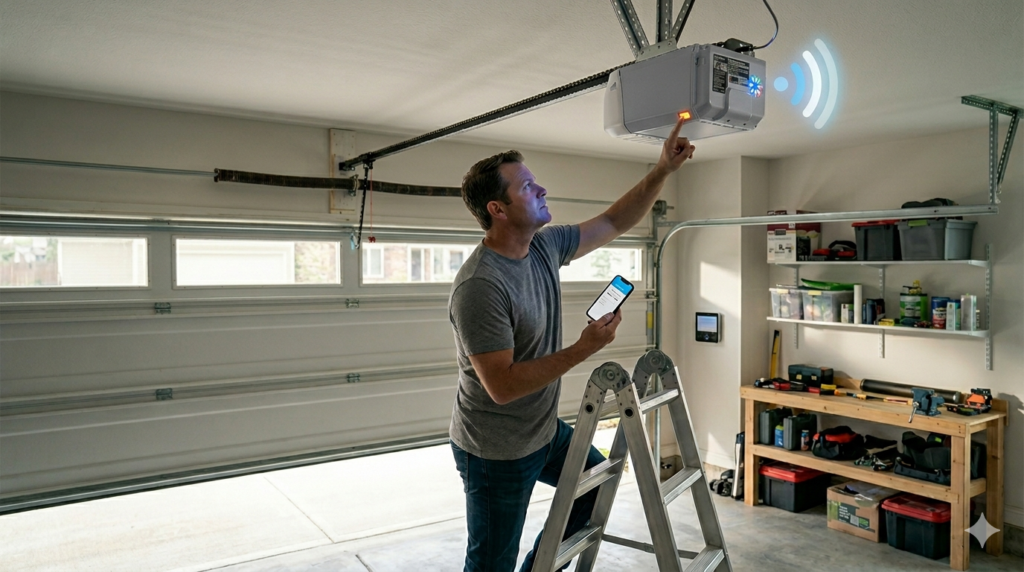
If you’ve ever walked into your garage in Northern Virginia, pressed your MyQ garage door remote, and watched the door do… nothing, you know the frustration firsthand. Maybe the opener flashes, beeps, or simply refuses to respond. Before panic sets in, the solution might be simpler than you think: sometimes your MyQ garage door opener just needs a reset.
In this guide, we’ll explain why your MyQ garage door opener may need a reset, how to do it safely and effectively, and when it’s time to call a professional. By the end, you’ll feel confident tackling minor opener issues on your own—and know when to get expert help.
What Does “Resetting” a MyQ Garage Door Opener Mean?
Resetting a MyQ garage door opener is essentially restoring it to its default settings. This clears old programming, erases paired remotes or apps, and fixes glitches caused by power outages, firmware issues, or miscommunication between the opener and smart devices.
Think of it like rebooting your computer: sometimes a fresh start is all it takes for the system to run smoothly again.
Common Causes and Signs That Your MyQ Opener Needs a Reset
Even the best garage door systems can experience hiccups. Here are the most common reasons your MyQ opener may require a reset:
- Power interruptions: A recent outage or surge can disrupt your opener’s programming.
- App connectivity issues: Your MyQ app may not respond or show outdated status.
- Remote control problems: The garage door remote stops responding.
- Sensor malfunctions: Safety sensors or door sensors are not communicating correctly.
- Error lights or beeping: Your opener flashes, beeps, or displays unusual signals.
MyQ Reset Indicators
| Symptom | Likely Cause | Suggested Action |
| The door is not responding to the remote. | App or remote lost connection | Reset the opener and reprogram the devices. |
| Opener lights flashing | Power glitch or error | Reset system and check power source |
| The door reverses unexpectedly | Sensor misalignment | Inspect sensors and reset the opener. |
| MyQ app not updating | Connectivity or software issue | Reset the opener and reconnect the Wi-Fi. |
| Beeping without door movement | Internal error or battery backup alert | Reset the system and check the battery. |
Step-by-Step Guide: How to Reset a MyQ Garage Door Opener
Resetting your MyQ opener is straightforward, but safety is crucial. Follow these steps carefully:
Step 1: Prepare for a Safe Reset
- Ensure the garage door is closed.
- Disconnect the opener from power if needed (unplug or switch off the breaker).
- Keep children and pets away from the area.
Safety first: a moving garage door can cause serious injury.
Step 2: Locate the Learn Button
The Learn button is usually on the back or side of the MyQ garage door opener unit mounted to the ceiling. It may be red, yellow, purple, or green depending on your model.
Tip: Check your MyQ manual if you’re unsure.
Step 3: Press and Hold the Learn Button
- Press and hold the Learn button for about 6–10 seconds until the indicator light turns off.
- This erases all remote controls, keypads, and app connections.
Warning: After this step, all devices paired with your opener will need reprogramming.
Step 4: Reconnect Power
- Plug the opener back in or flip the breaker on.
- Wait a few seconds for the opener to initialize.
The indicator light should remain off until a new device is paired.
Step 5: Reprogram Remotes and the MyQ App
- Remote Controls: Press the Learn button briefly, then press the button on your remote. The indicator light will blink to confirm.
- MyQ App: Open the app, follow prompts to connect the opener to your home Wi-Fi, and test the door remotely.
Pro Tip: Always test each remote and app command multiple times to ensure proper communication.
Step 6: Inspect Safety Sensors
After a reset, it’s a good idea to check your safety sensors:
- Ensure lenses are clean and facing each other.
- Remove obstructions like leaves, boxes, or tools.
- Confirm lights on both sensors are steady.
Sensors misaligned during a reset can prevent the door from closing properly.
Step 7: Test Your Garage Door
- Use both the wall switch and MyQ app to operate the door.
- Watch for smooth operation, proper opening and closing, and absence of unusual noises.
- If the door hesitates, reverses, or stops, inspect tracks, rollers, and springs carefully.
Never force a door manually if it feels heavy or unbalanced—broken springs or cables are dangerous.
Safety Tips for Resetting and Using MyQ Openers
- Never attempt to repair torsion springs yourself.
- Keep hands and fingers away from moving parts.
- Use a ladder safely when accessing the opener unit.
- Disconnect power before inspecting wiring.
- Only use manufacturer-approved remotes and replacement parts.
Following these safety tips prevents accidents while troubleshooting your opener.
When to Call a Professional
Some MyQ issues require expert attention, even after a reset:
- The door still doesn’t respond to the app or remotes.
- The garage door reverses unexpectedly or stops mid-operation.
- Broken springs, cables, or rollers are suspected.
- The opener flashes continuous error lights.
- Persistent mechanical noise or unusual vibrations.
For homeowners in Northern Virginia, a certified garage door technician can diagnose and fix these problems safely and efficiently.
Why Northern Virginia Homeowners Benefit from Professional MyQ Services
Living in Northern Virginia, weather changes and power fluctuations can impact your garage door opener more frequently than in other regions. A local professional knows:
- Common regional electrical issues.
- Proper MyQ installation and reset protocols.
- How to handle sensor alignment in older or cluttered garages.
If your MyQ opener keeps acting up after a reset, our Northern Virginia garage door experts can inspect, repair, and ensure your system works reliably — saving you time, frustration, and potential damage.
Final Thoughts
Resetting your MyQ garage door opener is often the quickest way to fix minor glitches and restore smooth operation. Remember:
- Identify the signs and triggers for a reset.
- Follow safe step-by-step procedures.
- Inspect sensors and mechanical components after resetting.
- Reprogram remotes and the MyQ app.
- Call a professional if the problem persists.
A properly functioning MyQ opener not only makes your life easier but also keeps your home secure and your garage door safe to use.
FAQs: How to Reset a MyQ Garage Door Opener
1. How often should I reset my MyQ garage door opener?
Only reset when troubleshooting problems, after a power surge, or when devices aren’t responding. Routine resets are not required.
2. Will resetting delete all my remotes and app connections?
Yes, a full reset clears all previous programming. You’ll need to reprogram remotes and reconnect the MyQ app.
3. Can a MyQ reset fix sensor problems?
It can resolve minor communication glitches, but misaligned or dirty sensors will still need cleaning or adjustment.
4. Is it safe to reset the opener during a storm?
No, avoid resets during active storms or power surges to prevent electrical hazards. Wait until conditions are safe.
5. Should I call a professional if my opener still doesn’t work after a reset?
Yes. Persistent issues may indicate mechanical or electrical problems that require expert repair, especially in Northern Virginia homes with older garage doors.